
Features
Depth for the already-interested. Everything on this page is shipped and working today; anything still to come lives on the roadmap.
The audio layer
Two voices share your ears, with different jobs. The Announcer is generated and navigational: it tells you what plates to load, what rep target you’re chasing, and what’s next. The Coach is authored and personal — cues, instructions, motivation — in your own recorded voice, or your coach’s.
Before the work starts, countdown beeps (you choose how many, 1–10) give you time to actually take the deep breath the cue just asked for.
You control all of it without touching your phone: headphones, Apple Watch, Siri, the Lock Screen player, or a Live Activity. Your phone stays in your pocket.
Where the clips come from
The looped clip that carries you through a set can come from anywhere: your own edits of songs in your library, Trending clips shared by the community (Gym Jockey shares song references, never audio files), built-in clips if you don’t have Apple Music, or a cadence you record in your own voice.
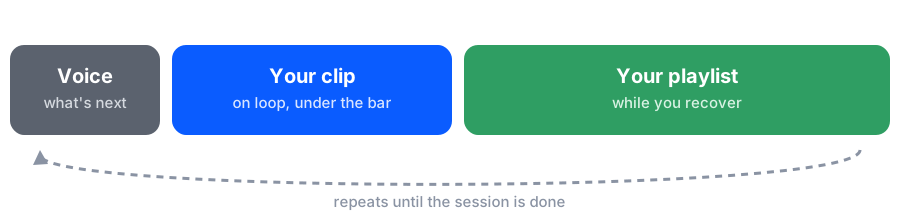
Your playlist attaches to the whole session — the music between sets is yours, untouched.
Notes that wait for their moment
Notes in other apps die because you tune them out. Gym Jockey’s notes engine is built around that problem: record as many notes as you like, and the app caps how many surface at any one moment — so the one you hear actually lands.
Notes can also be conditional: a note that only fires on your last set, or one that only speaks up when you jump up in weight — exactly when “remember to brace” matters most.
And to be clear: nothing is pre-written. The notes system is empty until you (or your coach) put something in it. It’s entirely optional — powerful if you feed it, invisible if you don’t. The configurable notes engine is a Pro feature.

Tracking that guides
Gym Jockey models equipment properly: barbells, paired weights, single weights, bodyweight, bands, machines — each with its loading style (two-sided, single-side, pin-loaded). That’s what makes guidance like “load 40 per side” possible: the app knows your bar weighs 20 kg and your target is 100.
Exercises can be rep-based or time-based. Supersets are first-class: the catalog ships with pre-built combinations, and you can build your own as custom exercises (a Pro feature).
Timers come in three kinds: classic per-exercise rest, custom per-set, and — plain cool — heart-rate-based: recovery ends when your heart rate says so, not when a clock does.
Reporting
The drill-down goes to the set level: average, set 1, set 2, set 3, set 4 as separate trendlines. That’s how you see what an average hides — your early sets plateauing while the later ones keep climbing under double progression, which is the program working as designed.
A per-muscle heat map shows where your training volume actually lands. Recovery-time and heart-rate-range charts round out the picture.


Training context
Numbers without context lie. Session check-ins (energy, sleep, pain, alcohol, medication, body weight — you choose which appear) capture how you arrived at the gym.
Periods span sessions and carry over until you turn them off: deload, cut, minor injury, sick, travel. Events mark a single session: major injury, program change, technique reset. Together they turn “I think my sleep is hurting my numbers” into a structured before/after you can actually look at.


Mid-workout, tap and hold to record a quick voice memo — available to everyone, with a cap on how many you can keep.
Apple Watch

Your data
Everything lives on your device and in your own iCloud — backup and restore included, no proprietary servers anywhere. Workouts are written to Apple Health. Exports are yours anytime, in formats ready for whatever you want next — including handing your numbers to whatever AI you like. Your data, your judgment.
Coming from another app? See Switching.